
The Parameter View provides a centralized interface where you can view and edit all model parameters in one place. To access it, select the Parameter Overview leaf under the Model → Biochemical branch (see below).
This view is especially useful for making edits efficiently, as it eliminates the need to navigate throughout the model tree whenever you need to update several parameters. At the top, you will see the initial concentrations for all species, followed by the initial simulation time and the volumes of all compartments. At the bottom, the kinetic parameters for all reactions are displayed.
To edit any value, double-click on the cell you wish to change, enter your new
value, and press the return key or click elsewhere. Your edits will not be
applied to the model immediately; instead, a * will appear next to the name
of a changed parameter, indicating that it has been modified but not yet
committed. To finalize your changes, either press the Commit button at the
bottom of the dialog or leave the widget. The updates will then be applied to
the relevant objects in your model.
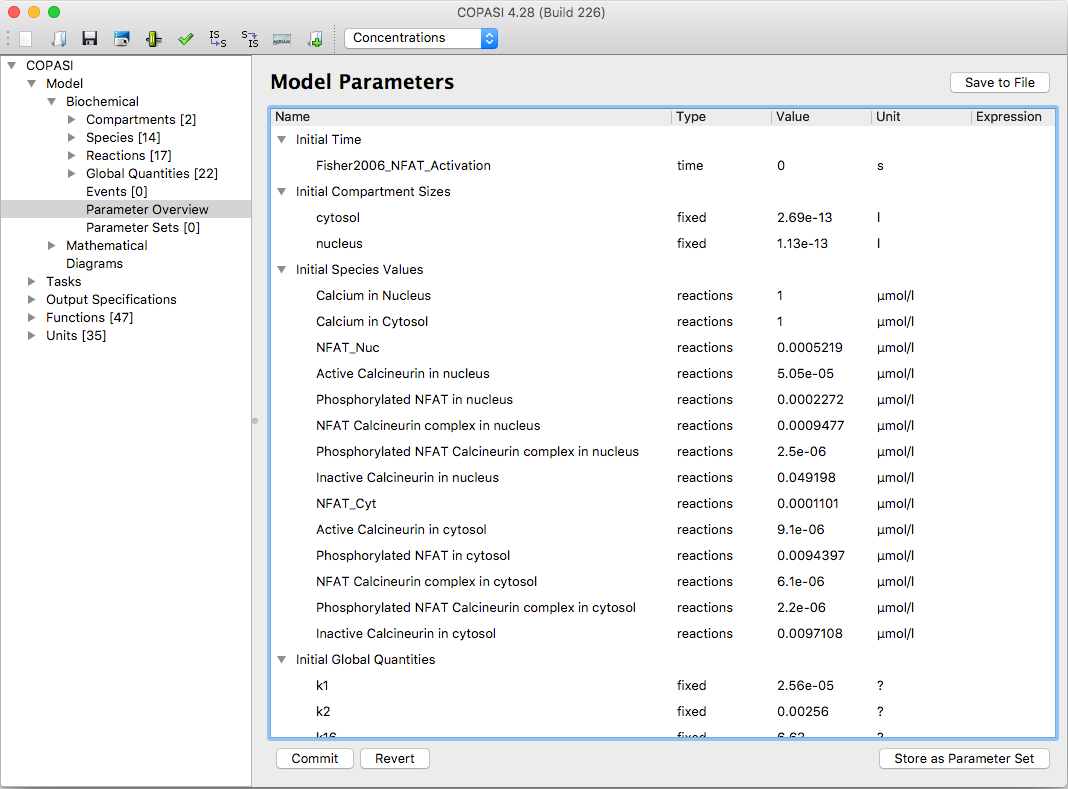 |
| Parameter View |
You can export the current parameter settings by clicking Save to File. Parameters can be saved in tabular formats such as TSV or CSV, as plain text, or in INI format. The INI format can be used later for command-line operations (see the command line reference).
Alternatively, you can store the current parameter configuration as a parameter set for easy reuse. To do this, select Store as Parameter Set.
COPASI also contains a list of Parameter Sets, that have been either created, using the Store
as Parameter Set option from the Parameter Overview, or have been created by Optimizations or
Parameter Estimation runs, with the Create Parameter Sets option enabled.
In the Parameter Sets overview, you can create new Parameter Sets, or delete existing ones. In the
detail view you can Apply them, that is to overwrite the current models state with the stored one
(COPASI will give you the option of saving the current state before). It will also highlight
differences of the current model state from the one stored in the parameter set.