




COPASI provides a single method for the explicit simulation of stochastic differential equations (SDEs): the stochastic Runge–Kutta (RI5) integrator. Unlike stochastic simulation algorithms such as Gillespie or τ-leaping, the RI5 integrator directly solves differential equations that include an explicit noise term.
Noise can be added at the reaction level in COPASI by defining a Noise Expression for individual reactions. To do this, navigate to COPASI → Biochemical → Reactions, select the reaction of interest, and click the “Add Noise” button next to the rate law. This enables you to specify a noise term to be included in the reaction rate. By default, COPASI sets the noise term proportional to the square root of the absolute particle flux for the reaction.
Example:
To illustrate, start by creating a new model. First, change the Quantity
Unit to 1 (dimensionless) instead of the default mol
(COPASI → Model → Quantity Unit). Then go to COPASI → Model →
Biochemical → Reactions and define a simple reaction: A -> B. Leave all
other settings at their defaults, but use the “Add Noise” button (to the right
of the rate law selector) to include a noise term. Next, set the initial
concentration of A to 20 [1/l] (COPASI → Model → Biochemical →
Species).
Changing the Quantity Unit from mol to 1 makes the model quantities
dimensionless. Alternatively, you could switch the mode in COPASI from
“Concentration” to “Particle Numbers” using the dropdown menu at the top.
To simulate models with noise, make sure to select the SDE Solver (RI5) in the Time Course task. You can further adjust several RI5 integrator parameters:
With the example model and default settings, after running the simulation, you will observe a time course influenced by stochastic noise.
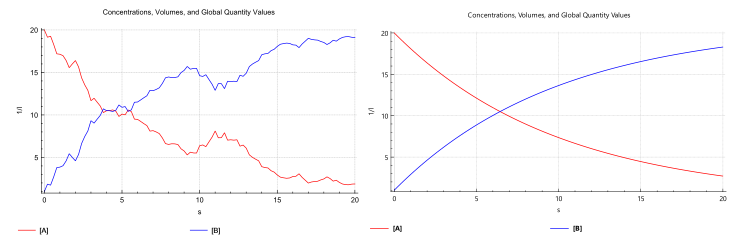 |
| Simulation with SDE (left) and deterministic (right) |